
If you’ve just downloaded Fire Kirin or received your account details from a distributor, the next step is logging in.
This might sound simple, but depending on whether you’re using the app or the web version, there are small differences you should know about.
Logging in correctly ensures you get smooth access to your games, secure transactions, and uninterrupted playtime. Let’s walk through how it really works.
(Note: If you don’t have Fire Kirin account, click here. You’ll get account for free with $5 Free Play.)
Fire Kirin Login With Username/ID and Password
First, you need a Fire Kirin account.
Unlike most casino-style apps, you don’t create your own Fire Kirin account directly from the app or website.
Instead, you receive a login ID and password from your distributor, the person or store that manages your credits and withdrawals.
Once you have those credentials, you can log in anytime from either the mobile app or the web link.
How to Login to Fire Kirin
- Visit the Official Login Page: Click on the button below to access the Fire Kirin login portal. Or, open Fire Kirin app, if you have downloaded and installed it on your phone.
- Enter Your Login Details: Type in your username and password correctly and click on “Login”
- Start Playing: Once logged in, you can explore a variety of thrilling games.
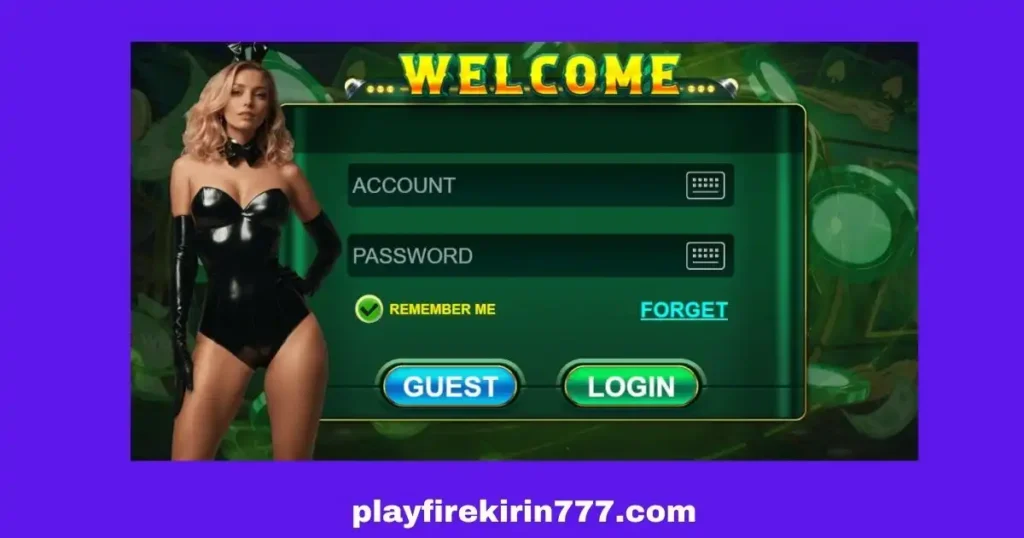
Fire Kirin App Login (Android and iPhone)
After installing the app, open it and wait for the main login screen to load. You’ll see two fields, one for your ID and another for your password.(similar to picture above)
Enter them exactly as given to you by us or your distributor. Pay attention to uppercase and lowercase letters since the system is case-sensitive.
If you get an error saying “Invalid ID or Password,” double-check for typos or extra spaces.
Some older versions of the app might require you to uninstall and reinstall if you’re switching devices. Once you log in successfully, the app will remember your credentials until you log out or update.
If you’re using an iPhone or iPad, make sure you’ve installed the version from the official download link your distributor provided.
Avoid downloading Fire Kirin from third-party websites or “mod” APK sources. They’re unsafe and often cause login issues.
Fire Kirin Web Login (Play Without Download)
If you prefer not to download anything, you can log in directly through your browser. Just go to the official link: http://start.firekirin.xyz:8580/
You’ll see the same login fields as in the app. Enter your ID and password, then click “Login.”
The web version loads faster, doesn’t take up phone storage, and works great even on older devices.
It’s also easier to access from any computer or phone if you’re switching devices or playing while traveling. Players often prefer the web version for its smooth gameplay and fewer connection errors.
Forgot Password Issue?
If you forget your password, don’t worry.
You can’t reset it directly from the app. You’ll need to contact your distributor. They have backend access to reset or recover your login details. When messaging them, provide your username and explain that you’ve forgotten your password.
Account suspended Issue
If your account is suspended or locked, it’s usually because of inactivity or verification issues.
Again, your distributor can help unlock it. Always deal with your original distributor instead of random online contacts claiming to “fix” accounts for a fee.
Conclusion
Logging into Fire Kirin is simple once you understand how the system works.
Your distributor handles your account credentials, and you can play either through the app or the web version depending on what’s most convenient.
Keep your login ID and password saved somewhere secure, like a password manager or a locked notes app. Avoid sharing your credentials with anyone, not even friends. Remember that Fire Kirin distributors never ask for your password unless they’re verifying your identity for account recovery.
Always use the latest version of the app to prevent login glitches.
And if the server is under maintenance or you’re getting a blank screen, try the web version instead. It usually connects faster.
FAQ
How can I log in to Fire Kirin on Android?
First, you have to download the Fire Kirin app for Android, open it, and enter your login credentials to start playing.
Can I get a free username and password?
Yes! Simply fill out the form or message us on Facebook, and we’ll provide a free Fire Kirin account along with a $5 free play bonus.
How do I reset my password?
If you created your account with us, contact us to reset your password. If other distributor created your account, reach out to them for help.